
How to Respond to a Request on SilvIA for Accommodations
A step-by-step guide to managing your rates and responding to booking requests on SilvIA.
Step-by-Step Guide
Access the application
Open the email you received and click on “Link to the application details” to view all the information about the bid.
Create Your Own Rate Plan
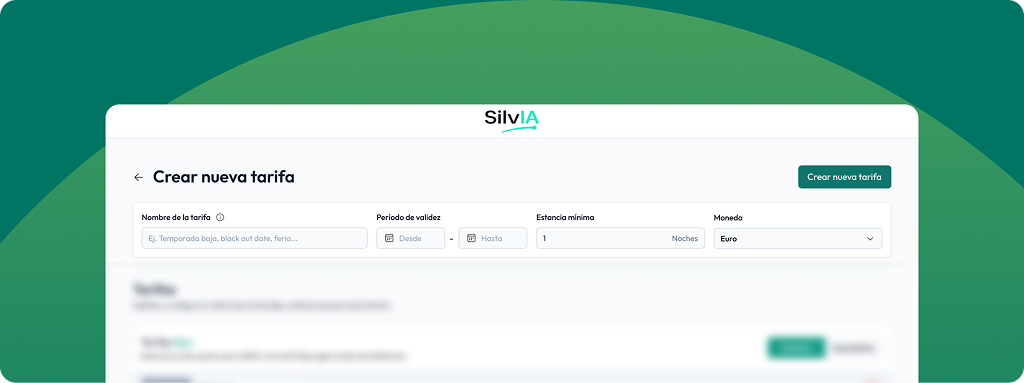
Click “Create Rate” and fill in the general information.
Rate Name: This name allows you to identify the rate you're creating. For example: Low Season Rate, Winter Rate, Premium Rate...
Validity period: This refers to the time period during which the rate will apply. For example: if you're setting your high-season rate, you would specify here the start and end dates of what you consider to be "high season" for your hotel.
Minimum stay: This refers to the minimum number of nights required to take advantage of your rate.
Currency: This is the currency to use for your prices. If your pricing is in a currency other than the euro, you can specify it here.
Enable the rate type
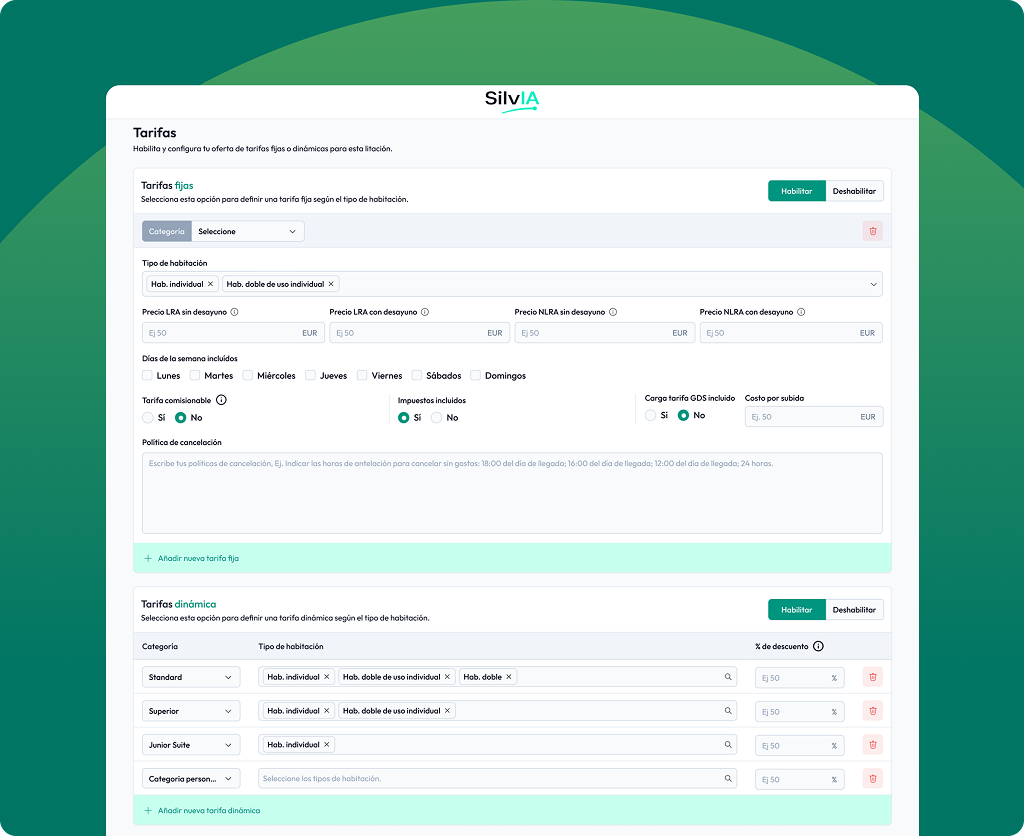
Enable the rate type you want to offer, and “Enable or Disable” the one you want to use in your rate schedule.
Flat rates: These are flat rates that you offer based on the room category. To set them up, you'll need to enable and specify the following information:
- Category: This refers to the types of room categories you have available (Standard, Superior, Junior, Apartment, Others). You can set up all the categories you offer and set their prices.
- Room type:You must define the room types available for the specified room category.Example: Category: Standard, Available room types: Single room and double room for single occupancy.You can add as many room types as you need.
- Prices:You must list all available rates, whether LRA or NLRA, with or without breakfast. - LRA (Last Room Availability): This stands for "Last Room Availability." - NLRA (Non-Last Room Availability): This is the opposite of the previous term. It means that theThe hotel does not guarantee the availability of the negotiated rate if only a few rooms remain; in that case, the hotel may close out that rate and sell the remaining rooms at a higher price to the general public.
- Days of the week included:Specify which days of the week this fare can be used. For example, if you select all days, it means this rate can be used on any day of the week during the validity period; but if you select Monday and Wednesday, it can only be used on Mondays and Wednesdays that fall within the validity period specified in step 2.
- Commission payable to the agency:Specify whether the rate is commissionable or not; if it is, specify the commission percentage.
- Taxes included:Specify whether or not taxes are included in the rate; if they are not, indicate the tax rate as a percentage.
- GDS fee included:Specify whether the fare charge in the Global Distribution System (GDS) is included or not. If it is not included, specify the amount.
- Cancellation Policy:Please specify your policy for this room category.
Dynamic Pricing: If you offer a percentage discount off the standard rate, you can enable this rate type. To do so, you'll need to configure the following:
- Category: This refers to the types of room categories you have available (Standard, Superior, Junior, Apartment, Others). You can set up all the categories you have and specify their discounts.
- Room type:You must define the room types available for the specified room category.Example: Category: Standard, Available room types: Single room and double room for single occupancy.You can add as many room types as you need.
- Discount %:It is the percentage savings compared to the commercial rate you have at that time.
Tip: You can enable both types of rates at the same time if you offer both options.
Define taxes and fees (Optional)
If you need to add other types of taxes or fees, you can create them in this section. To do so, you must provide the following information:
Rate: You must specify the type of tax or fee to be recorded. The available options include: tourist tax, municipal tax, occupancy tax, and state tax.
Type of fee: It can be a percentage rate or a fixed rate.
Value: You must report either the percentage or the fixed amount, depending on the type of rate.
Rate Application: Here you specify the conditions under which the fee applies, for example: per person, per night, for a minimum stay...
Included in the rate: Enable this option only if the fee you are entering is already included in the previously configured prices; if it is an additional cost, leave it disabled.
Define the available services (Optional)
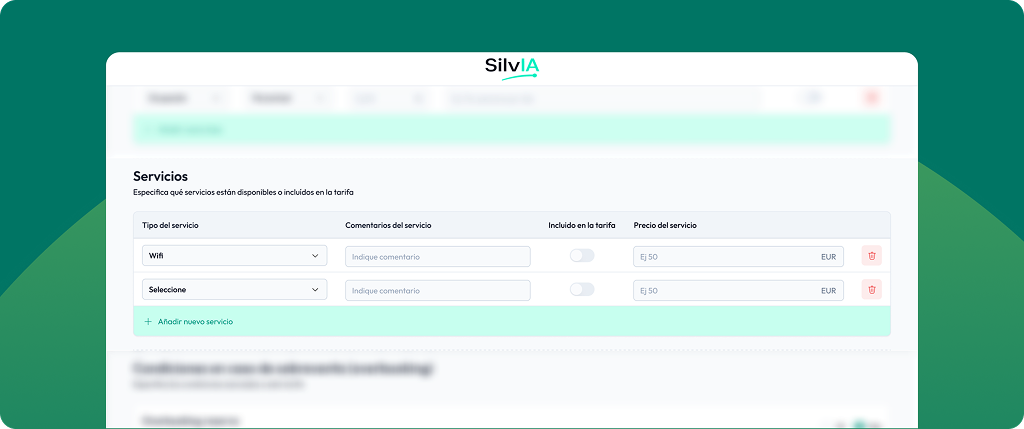
Whether or not these services are available, you can list them here to make your proposal more appealing. If you offer these services, you must provide the following information:
Type of service: Select the type you have available, whether it's breakfast, Wi-Fi, parking, or other options.
Service comments: Here you can provide a little more detail about your services, such as: the types of breakfasts available, parking policies, gym hours...
Included in the rate: You must specify whether the use of this service is included in the previously set prices or if it incurs an additional cost. If it is included, enable this option.
Service price: Specify the price of the service only if it is not included in the previously configured rate.
Conditions in case of overbooking
You must state the terms of your fare regarding overbooking. To do so, you must provide the following information:
Overbooked reservation: In case of overbooking, will the customer be relocated to a nearby hotel with similar characteristics?
Payment in the event of overbooking: Will the accommodation cover the cost in case of relocation due to overbooking?
Type of Early Departure Fee: Specify the type of fee that would apply for an early departure. The available options include:
- Free.
- Fixed cost: You must specify the amount.
- Variable cost: You must specify the percentage.
Additional Information (Optional)
If you have any additional comments or policies not covered above, please post them in this section so you can clarify any points that were not addressed.
Additional Tips
Your rates must cover 100% of the requested time.
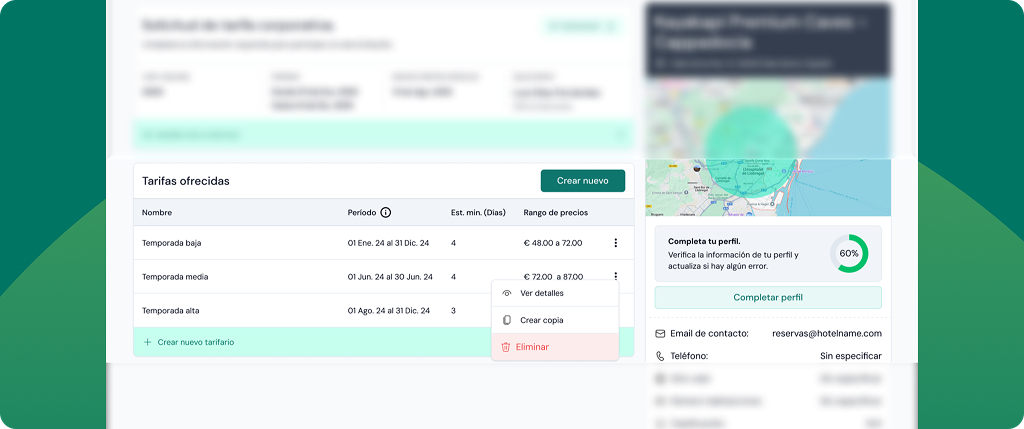
Example: If the request for proposals calls for year-round stays (January through December), your rates must cover the entire period. In other words, if you create a rate that covers June through July, you will still need to specify the rates for the remaining months (January through May and August through December).To speed up the process, you can duplicate an existing quote, which means you'll only need to make a few changes to your new rate.
Having a complete profile increases your chances of winning more bids.
Do you need help?
Contact us at silvia@silv-ia.com